
Key Takeaways
- Offline survey tools collect data without internet by storing the form and responses on the device, validating entries locally, and syncing to a server when a connection returns.
- "Offline-capable" is not "independent forever." Downloading the form, retrieving updates, and pulling server-side reference data still require a connection.
- Local storage is the biggest risk. Until a record syncs, it exists in only one place, so a lost, wiped, or cleared device usually means that data is gone.
- GPS reads location from satellites and needs no mobile data. Photos, audio, and signatures save on the device and upload when the connection returns.
- Synchronisation determines data integrity. How a tool queues, retries, and handles form versions determines whether offline records arrive complete.
- Offline collection removes the connectivity problem but adds operational ones: delayed central visibility, device-security exposure, and duplicate records across devices.
- In India, personal data collected offline falls under the Digital Personal Data Protection Act, 2023; a tool's features support compliance but cannot deliver it alone.
Ask any M&E officer who has run a household survey in a low-connectivity district, and they will tell you the same thing: the signal is the first thing to fail and the last thing you can count on. An enumerator reaches a village three hours past the last cell tower, interviews forty families, and by the logic of most software, nothing should be possible there. The form lives on a server, and the server might as well be on the moon. Yet the interviews happen, the data is captured, and two days later every record shows up in the central database without a byte missing.
That is the job offline survey tools do, and how they do it is more deliberate than "the app works without internet".
Offline survey tools collect data without a live connection by storing the survey form and every response on the device itself, checking each entry against the form's own rules as it is typed, holding finished records in a queue, and sending them to a server only once connectivity returns. The internet is needed to push a form out beforehand and to pull the data back afterwards. It is not needed for the collection in between. Everything from the first question to the last signature happens on the device.
Here is the distinction that trips up most buyers. "Offline" is not one capability; it is several. Collecting responses offline, storing them offline, validating them offline, capturing GPS or a photo offline, and synchronising them later are separate functions, and a given tool may do some of them well and others not at all.
What Are Offline Survey Tools?
Offline survey tools are applications, usually a mobile app and sometimes a browser-based web form, that let field teams collect structured data with no internet connection and upload it once a connection is available. You will also see them called offline survey software, offline data collection tools, or field survey software.
The defining trait is local-first operation. The form definition and the responses sit on the device's own storage until the tool sends them. The workflow is consistent across the category: the app downloads a blank form from a server while online, the enumerator fills it out offline and can save progress at any point, and completed forms are submitted back to the server once a connection is available. The open-source platforms that much of the sector is built on, along with the established commercial tools, all follow this same download, collect, queue, and sync pattern.
These tools cluster in sectors where fieldwork outruns connectivity, and they are used at scale by organisations ranging from public-health agencies to humanitarian responders. The shared requirement is simple: the fieldworker has to go where the respondents are, and the respondents are usually where the network is not.
How Do Offline Survey Tools Work Without Internet?
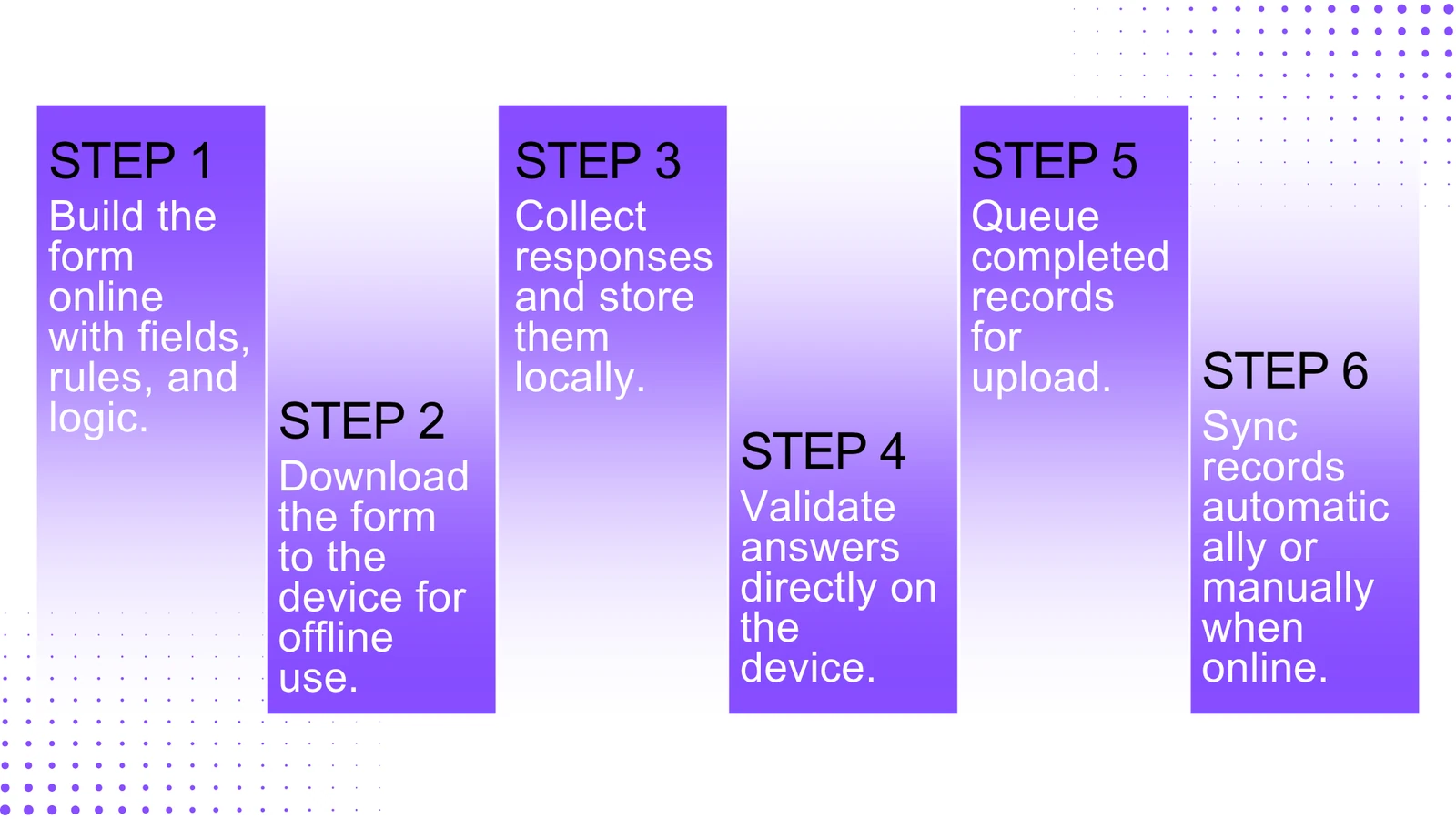
The architecture rests on one decision: separate the moment of collection from the moment of transmission. Here is the sequence, step by step.
Step 1: The form is prepared while online
A form is built on a server or in a form designer, where fields, question types, validation constraints, skip logic, and required-field rules are all defined. This step needs a connection. Some platforms author forms as spreadsheets (the widely used XLSForm format) that compile to a standard form definition; others use a browser-based visual builder. Either way, the form is then deployed from the server before any device can collect on it.
The part worth understanding is that the form's logic travels with it. The rules deciding what is mandatory, what values are valid, and which question comes next are baked into the form definition, and they run on the device later with no server in the loop.
Step 2: The form is downloaded to the device
Before heading out, the enumerator downloads the blank form while still connected. In a mobile app, the form definition is saved into the app's storage. For browser-based web forms, the form and the responses are stored in the browser's own offline storage, after which the form opens and accepts data with no connection at all.
One detail is easy to overlook and costly to get wrong: the blank form has to stay on the device. The blank form is the template the enumerator fills out, and in several apps, deleting it makes the responses already collected against it uneditable until it is downloaded again. That is why field teams are told not to clear out forms mid-project to free up space.
Step 3: Responses are collected and stored locally
As the enumerator enters answers, every entry, photo, and coordinate is written to local storage, not transmitted anywhere. Data is stored first on the device, and well-built apps save progress automatically as the enumerator moves between question screens, so a crash or a dead battery does not wipe an in-progress interview.
Unfinished interviews can be kept as drafts. A draft is a form that has been started but not yet sent, which can be reopened, edited, and finalised later. An enumerator can pause a long household interview, close the app, and pick it up again, all offline.
Step 4: Validation runs on the device
Because the validation rules are part of the stored form, the app checks responses at the point of entry without touching a server. Required-field checks, numeric ranges, date formats, and constraints such as "end date must fall after start date" all run locally. This is one of the real advantages of digital collection over paper. The error surfaces while the respondent is still sitting in front of the enumerator, not weeks later during data cleaning.
Validation has a ceiling, though. On-device checks can confirm that an answer is well-formed. They usually cannot confirm it is true against a central record, for instance, that a beneficiary ID matches one registered on another device the same morning. That kind of cross-record check needs the server.
Step 5: Finished records are queued
Once an interview is complete, the record is finalised, meaning it is marked done, but it does not leave the device until there is a connection. A finalised form typically moves to a "ready to send" list, and if the device is offline or automatic sending is turned off, it waits there until the enumerator uploads it. Teams routinely finalise many forms offline and upload them in bulk later.
Step 6: Records synchronise after reconnection
When the device gets a connection, the queued records are sent to the server. Depending on the tool and its settings, this is automatic or manual. Once a record lands on the server, it is processed, stored, and made available for export and analysis. Synchronisation carries enough nuance that it gets its own section below.
What Actually Happens to Data While You Are Offline?
While offline, the data never leaves the device. It is written to local storage, which in many modern mobile apps is a structured on-device database such as SQLite, and in browser-based tools is the browser's own offline storage. Each finalised record waits in a queue. As far as the server is concerned, the interview has not happened.
Two consequences follow, and both carry operational weight:
- No backup until sync: Offline-collected data is not stored anywhere but the device until it uploads. The only copy is the one in your hand.
- Server features stay dark: Any function that depends on the server, such as live dashboards, cross-device lookups, or server-side validation against a central dataset, is unavailable until reconnection.
Offline capability protects the act of collecting. It does not make the entire platform available offline.
Offline vs Online Survey Tools: What Each Function Requires
Treating "offline-capable" as a single yes-or-no is where field deployments fall apart. The honest approach is to ask, function by function, what needs a connection and what does not.
| Function | Works offline? | Notes |
|---|---|---|
| Entering responses | Yes | Core offline capability in all major tools |
| Local storage of responses | Yes | On-device database or browser storage |
| On-device validation | Yes | Runs against rules embedded in the form |
| Skip logic and conditional questions | Yes | Branching logic travels with the form |
| GPS capture | Yes | Read from satellites, independent of mobile data |
| Photo, audio, signature capture | Yes | Saved as local files, uploaded on sync |
| Saving and resuming drafts | Yes | Stored locally until finalised |
| Downloading the form initially | No | Requires a connection before fieldwork |
| Retrieving form updates | No | New versions download only when online |
| Pulling server-side reference data | No | Beneficiary lists, cross-device lookups |
| Final sync to server | No | The data has to reach the server eventually |
| Live dashboards and central reporting | No | Server-side, available only after sync |
Behaviour varies by platform, which is exactly why this table is a set of questions to test rather than a list of guarantees. Some tools degrade gracefully when the connection drops. Others simply stop. The only way to know is to test the specific tool in conditions that match the field.
A handful of practical scenarios fill in the rest of the picture.
What happens if the device is lost or stolen?
Any unsynced records are gone, and if the device is not secured, the data may be exposed. Records that already synced are safe on the server. This is the strongest argument for syncing often and locking down devices before they leave the office.
What happens if the app is uninstalled or storage is cleared?
This is a well-documented failure mode across the category. Apps that store data in private app storage, which is the secure default for good reason, purge all of it when the app is uninstalled. For browser-based collection, clearing the browser cache or site data removes stored forms, drafts, and queued submissions, and none of it can be recovered unless it was already uploaded. The rule writes itself: never uninstall or clear storage until everything has synced.
What happens if data sits unsynced for days?
Technically, it persists as long as the device holds it. Practically, every unsynced day is another day of single-copy records with no backup. The established habit is to sync whenever a connection allows rather than letting a week of interviews pile up on one handset.
What happens when the form changes mid-project?
Devices keep using the version they already hold until they reconnect and download the update. Records collected on the older version stay valid but may map to a slightly different structure, which is why form versioning has to be managed on purpose, not left to chance.
What happens when several devices sync later?
Each device uploads its own queue, and the server stitches them together. Because the devices worked independently, overlaps such as two interviews of the same household only surface after everyone has synced. That makes de-duplication a post-collection task, not something the devices sort out among themselves.
What Happens When the Connection Returns?
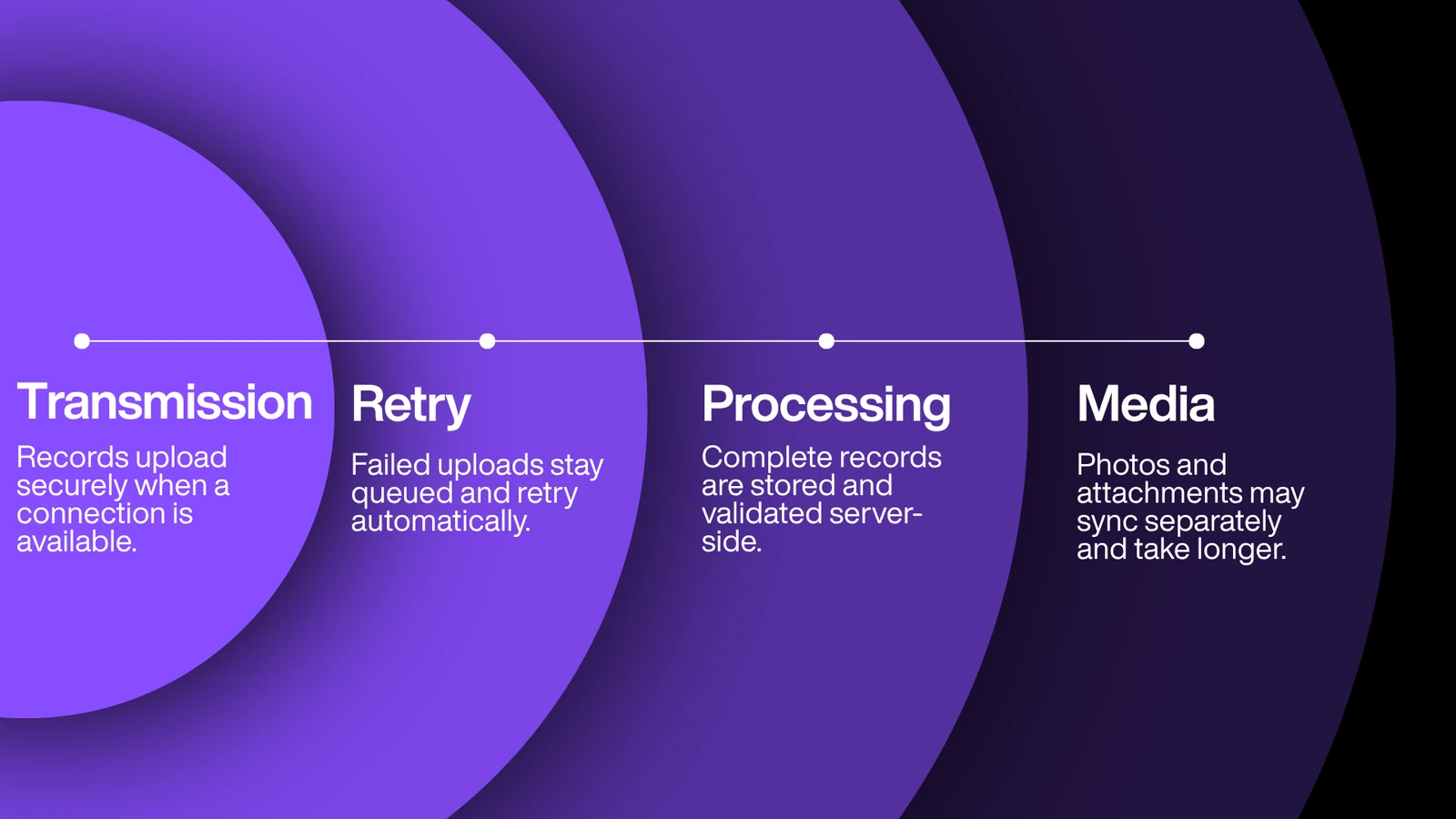
Synchronisation moves queued records from the device to the server and reconciles them into the master dataset. It is the most delicate stage in the lifecycle, and getting it right is what separates teams that run offline collection cleanly from teams that lose data at the final step.
- Transmission: The app sends each queued record over an encrypted connection. Well-designed synchronisation is built to hold up on poor-quality connections, and the server will not integrate a half-received record: a partial upload is rejected rather than stored as corrupt data. That matters in the field, where a usable signal might last thirty seconds from the window of a moving vehicle.
- Retry: If an upload fails or the connection drops mid-transfer, the record stays in the queue, and the app tries again later. Nothing is lost because the first attempt failed. It is simply still waiting its turn.
- Server-side processing: Once a complete record arrives, the server stores it, applies any server-side checks, and makes it available for export and analysis. Only at this point does the record exist anywhere other than the device that collected it.
- Media: Photos and other media files are larger than structured responses and may upload more slowly, sometimes on a separate pass. A record is not fully synced until its attachments have transferred too.
There is also a quieter field hazard worth naming, because it appears in the documentation of more than one platform: the device clock. If a handset's date is wrong, which happens after a fully drained battery, the secure connection to the server can fail with a certificate error and block sync until the date is fixed. A "sync failed" message in the field is often a device problem, not a server one.
The takeaway is blunt. The interview may have ended two days ago, but the data only becomes real, meaning visible, backed up, and analysable, at the moment of a successful sync.
How Offline Collection Affects Data Quality
It is tempting to treat offline capability as nothing more than a connectivity fix. That misses half the story, because the shift from paper to on-device collection changes data quality in both directions.
Where offline digital collection improves quality:
- On-device validation catches errors at the source, while the respondent is still present.
- Skip logic enforces consistency, so enumerators do not accidentally ask or skip the wrong questions.
- GPS tagging provides verifiable location evidence for every record.
- Photos and signatures create supporting evidence that paper forms never could.
- Device timestamps record when data was collected, which supports audit and quality review.
- Removing the paper-to-digital re-entry step wipes out an entire category of transcription error.
Where it introduces new risks:
- Delayed visibility: Because data is not seen centrally until sync, a supervisor cannot catch a misbehaving enumerator or a systematic mistake for hours or days. A problem an online system would flag on the first submission can repeat across dozens of interviews first.
- Duplicate records: Independent devices do not know about each other's submissions until all of them sync, so de-duplication lands on the data team.
- Metadata reliability: Timestamps depend on a correctly set device clock, and GPS depends on a decent satellite fix. A wrong clock or an indoor reading produces metadata that looks precise and is wrong.
- Data-loss exposure: Unsynced records live in one place. Device failure before sync is the single biggest data-quality threat in offline collection.
The honest summary: offline collection solves the problem of where you can collect and creates the problem of when you can supervise and how fragile the data is in the meantime. Teams that run it well manage the trade-off with frequent syncing, device-level backups, and supervisor spot-checks after each sync.
Are Offline Surveys Secure?
Offline survey data can be secured well, but its risk profile is different from online collection, and the difference sits on the device. When finished records are queued on a phone in someone's backpack, the phone is the perimeter.
The reality is two-sided. Offline collection can be considered more secure during the collection phase because responses are stored locally rather than transmitted, which cuts exposure in transit. At the same time, a genuine gap opens if a device is lost or ends up in the wrong hands. Both are true at once, which is why a serious security posture treats the layers separately rather than calling a tool "secure" and leaving it there.
Device-level security
Lock screens and full-device encryption, a standard Android and iOS feature, stop someone from reading files by, for example, pulling out an SD card. Some servers can refuse to exchange data with a device that lacks a lock screen or device encryption.
Local data protection
Storing data in private, app-specific storage, rather than a shared folder a file browser can reach, keeps it inaccessible even to someone holding the device. Mature collection apps default to private internal storage for this reason, and uninstalling the app removes the data.
Encryption at rest and in transit
Data stored on the device can be encrypted so it is unreadable without the key. At-rest encryption works by keeping the data separate from the key needed to read it, so stolen data stays safe as long as the key is not taken too. During sync, data should travel over an encrypted channel, typically TLS or SSL, to protect it between device and server. Where a platform offers end-to-end encryption, data is encrypted from the point of collection so that not even the platform operator can read it, and only the holder of the private key can. That is a specific architecture and should be verified per tool rather than assumed.
Authentication, access control, and audit trails
These govern who can open forms, who can see data, and what gets logged. Role-based permissions and access logs are what let an organisation answer the question "who touched this record, and when."
PII handling and data minimisation
Collecting only the personal data genuinely needed, and treating directly identifying fields with extra care, reduces the fallout if a device is ever compromised.
One distinction matters more than any single control: security features are not the same as legal compliance. A tool with strong encryption is not automatically compliant with any particular law. Compliance depends on how the organisation configures the tool, obtains consent, limits collection, and manages data across its whole lifecycle.
Offline collection and India's DPDP Act, 2023
For data collection involving individuals in India, the governing law is the Digital Personal Data Protection Act, 2023, which received Presidential assent on 11 August 2023. The Digital Personal Data Protection Rules, 2025 were notified by the Ministry of Electronics and Information Technology in November 2025, and the Data Protection Board of India was established on 13 November 2025. Implementation is phased: the establishment provisions took effect immediately, while the substantive compliance obligations are scheduled to come into force around May 2027, roughly eighteen months after notification. The timeline is still unfolding, so confirm the current position before relying on any specific date.
Several of the Act's requirements bear directly on field data collection:
- Consent is the primary lawful basis: Personal data may be processed for a lawful purpose for which the data principal has given consent, or for certain legitimate uses defined in the Act. In the field, this is why capturing consent, including by digital signature, at the point of collection matters.
- Data minimisation and purpose limitation: Only data necessary for the stated purpose should be collected, and it should not be reused for a new purpose without fresh consent.
- Right to correction and erasure: Data principals have the right to correction, completion, updating, and erasure of their personal data. Once consent is withdrawn or the purpose is served, the data must generally be erased.
- Right to withdraw consent, and withdrawing it should be as easy as giving it.
The implication for offline work is specific. Personal data captured on a device is covered by these obligations from the moment of collection, not only once it reaches the server. That shapes how long data should sit unsynced, how devices are secured, and how an erasure request is honoured across every place a record exists.
Keep three things distinct. The law sets the obligations above. Good practice recommends controls such as at-rest encryption, private storage, and audit logs. And whether a particular product meets a given obligation depends entirely on configuration and use. Blurring the three is how misleading "compliant" claims get made.
Where Offline Survey Tools Are Used
Offline collection is the default in field-heavy sectors, not the exception.
- Rural development programmes in areas with patchy or absent coverage
- NGO fieldwork and humanitarian response, often in remote or crisis-affected locations
- Monitoring and evaluation, including baseline, midline, and endline studies that have to reach every sampled site regardless of signal
- CSR programmes tracking beneficiaries and outcomes on the ground
- Government field surveys and large-scale household enumeration
- Beneficiary registration for benefit delivery
- Agriculture programmes such as farm mapping, input distribution, and yield surveys
- Healthcare outreach, including screenings, immunisation drives, and community health worker visits
- Education programmes such as school assessments and dropout tracking
- Remote inspections and infrastructure or site assessments
What to Look for in an Offline Survey Tool
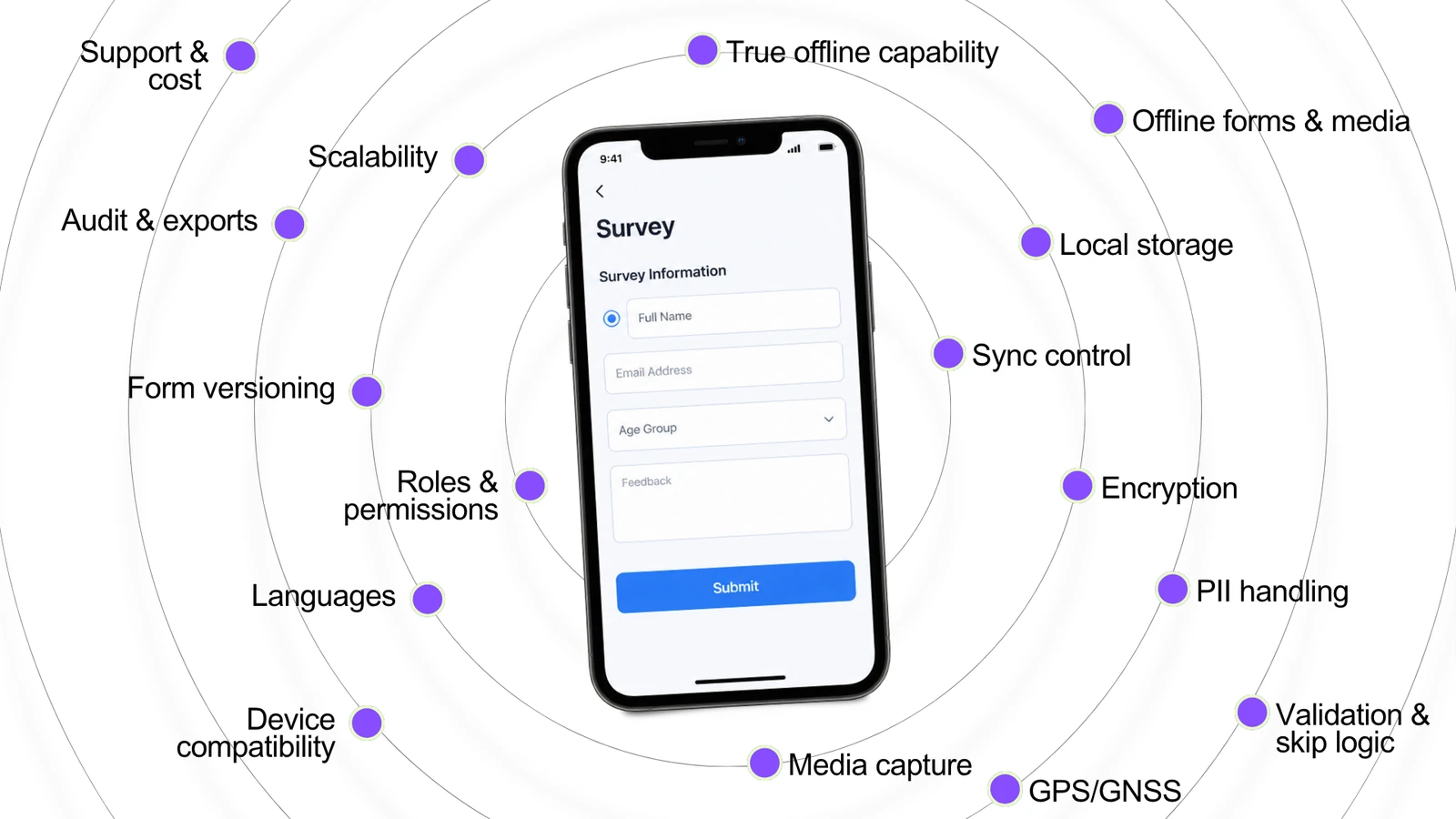
"Pick a tool with offline functionality" is useless advice, because offline support ranges from deep to decorative. Here is what to evaluate, and more to the point, what to test before you commit.
- True offline capability. Does the full collection workflow run with the device in aeroplane mode, or do parts fail quietly? Test it. Do not take the marketing page's word for it.
- Form availability offline, including any media or reference lists the form depends on.
- Local storage design, meaning where data is held, whether it is private to the app, and how much the device can hold.
- Sync control, whether automatic, manual, or both, which matters for managing data use and bulk uploads.
- Encryption at rest and in transit, and end-to-end for sensitive data where it is warranted.
- PII handling, including field-level treatment, masking, and controls for identifying data.
- Validation depth and skip logic running on the device.
- GPS and GNSS capture and how accurate it stays offline.
- Media capture across photo, audio, video, and signature.
- Device and OS compatibility with the actual handsets your enumerators carry.
- Multi-language support for enumerators and respondents.
- Roles and permissions, covering who can create, edit, publish, and access data.
- Form versioning, meaning how updates reach devices and how older-version records are handled.
- Audit trails, data export formats, and analytics once data syncs.
- Scalability across many devices and thousands of submissions.
- Support, documentation, and total cost of ownership, which means licensing, devices, training, and support, not just the headline price.
The most useful recommendation is procedural, not technical. Test the tool on your real devices, in conditions that resemble the field, before deployment. A platform that runs flawlessly on a new phone in an office with Wi-Fi can behave very differently on a three-year-old handset in a basement with no bars.
Offline Survey Deployment Checklist
Before teams go out, work through this list.
- [ ] Download every form to each device and confirm it opens offline
- [ ] Test every required field and constraint
- [ ] Test all skip logic and conditional branches
- [ ] Test GPS and media capture, meaning photo, audio, and signature, with the device offline
- [ ] Put a device in aeroplane mode and run a full dummy interview end to end
- [ ] Test synchronisation by collecting offline, reconnecting, and confirming the record arrives intact
- [ ] Confirm each device has enough free storage for the expected records and media
- [ ] Configure security, including lock screens, device encryption, app passcodes, and private storage
- [ ] Check device date and time settings, since a wrong clock can block sync
- [ ] Train enumerators on the workflow, including how and when to sync
- [ ] Set a clear sync procedure covering how often and who confirms success
- [ ] Set a lost or stolen device procedure
- [ ] Confirm no one will uninstall the app or clear storage before data has synced
How Surve-R Approaches Offline Field Data Collection
Once the mechanics are clear, the useful question is whether a given tool is actually built around them. For impact-sector fieldwork in India, Surve-R, the field data collection product from Relific, maps onto the requirements set out above. The description below uses only capabilities stated on Relific's current website, and, as with any platform, each should be verified and tested against your own requirements before deployment.
| Field requirement | Why it matters | How Surve-R addresses it (per Relific) |
|---|---|---|
| Collect without connectivity | Fieldwork happens where signal does not | Described as 100% offline on Android and iOS |
| Reliable local storage | Unsynced data has to survive on the device | On-device SQLite storage |
| Return data to the centre | Records have to reach the server intact | Automatic sync when connectivity returns |
| On-device logic and validation | Catch errors at the point of entry | 25+ field types with conditional logic and validation |
| Location and evidence capture | Verifiable records | GPS, photo, and signature capture |
| Protect personal data | Field data often includes PII | Field-level AES-256 encryption at rest, automatic PII detection, PII masking in dashboards |
| Consent and erasure | Required under the DPDP Act | Consent capture and right-to-erasure tooling with an audit trail |
| Controlled access | Limit who sees sensitive data | Role-based permissions at form, field, and data level |
Surve-R can generate forms from natural-language prompts through its AI assistant, where sensitive fields such as phone, email, and Aadhaar are auto-classified as they are added, with only the last four digits of Aadhaar stored, and that collected data flows into an analysis workspace it calls Data Studio. At the company level, Relific's site indicates ISO/IEC 27001:2022 certification and GDPR compliance.
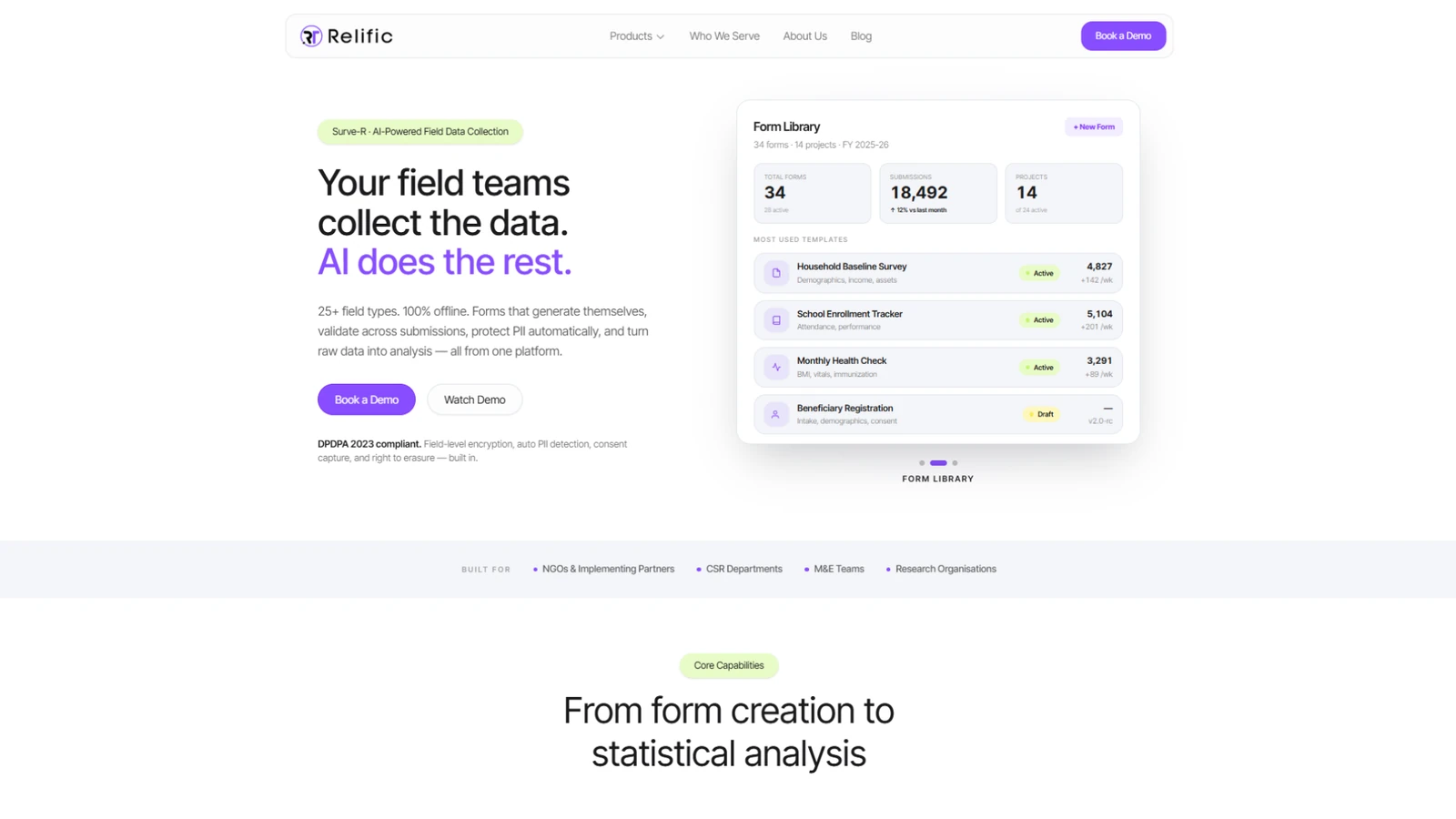
What stands out is not any one feature but the orientation. The hard parts of offline collection, namely secure local storage, dependable sync, on-device validation, and PII handling tied to a specific regulatory regime, are exactly where tools diverge, and exactly what the sections above say to test. A tool built around those concerns is responding to the real shape of field data work rather than to a feature checklist. Teams weighing options can also read Relific's blog, which includes a comparison of mobile data collection apps for NGOs covering Surve-R alongside KoboToolbox, ODK, and others.
Conclusion
Offline capability is described as the absence of an internet requirement. That framing sells it short. It is better understood as an architecture: a form and its logic moved onto the device, responses stored and checked locally, records queued, and data synchronised when a connection allows. The internet becomes something you need at the start and the end of the process, not all the way through it.
Grasping that full lifecycle is what prevents the failures nobody should still be having. The uninstalled app. The device that never synced. The duplicate records no one reconciled. The wrong clock that quietly blocked uploads for a week. It also means being straight about the trade-offs offline collection brings, namely delayed supervision, device-security exposure, and the fragility of single-copy data between collection and sync. These are all manageable, but only once they are named.
The principle underneath is plain. Whether a household gets counted accurately should not hinge on whether a fieldworker happened to have a signal that day. For organisations working where fieldwork and India's data-protection regime meet, the tools worth a serious look are the ones that treat secure local storage, dependable synchronisation, and privacy obligations as core design problems rather than afterthoughts.
Frequently Asked Questions
Yes. Offline survey tools store the form and the responses on the device, so data entry, validation, and media capture all work with no connection. The records upload to a server later, when connectivity returns.
Responses are written to local storage on the device. In mobile apps, this is commonly a structured on-device database such as SQLite, and in web-based tools it is the browser's offline storage. Finalised records sit in a queue until they can be sent.
It depends on the tool and its settings. Many apps can sync automatically when a connection returns, and many also allow manual bulk uploads so teams can control data use. A common pattern is that finalised forms wait in a "ready to send" list and upload when the device is offline or automatic sending is turned off, giving field teams control over exactly when records leave the device.
Yes. GPS, or more broadly GNSS, reads location from satellite signals, which are independent of mobile data and Wi-Fi, so a device can record coordinates with no SIM. One caveat: assisted GPS uses network data to speed up the first satellite fix, so the initial lock can be slower when fully offline. Maps and geocoding that rely on the internet are a separate matter from capturing raw coordinates.
Yes. Photos, audio, video, and signatures are captured and saved as local files linked to the record, then uploaded during synchronisation. Media files are larger than structured responses, so they can take longer to transfer.
Queued records transmit over an encrypted connection to the server, which stores each complete record and makes it available for analysis. Partial uploads are rejected rather than saved corrupt, and failed uploads are retried. Only after a successful sync is the data backed up and visible centrally.
They can be, but the device is the main risk surface. Security depends on private app storage, encryption at rest and in transit, device lock screens and encryption, access controls, and disciplined field procedures. Because unsynced records exist in only one place, a device lost before sync means lost, and potentially exposed, data.
Online-only tools need a live connection to load forms and submit responses, with validation and storage handled server-side. Offline-capable tools cache the form and store and validate responses on the device, queuing them to sync later. The practical difference is where each step happens, and whether fieldwork in no-signal areas is possible at all.